Liquid Cooling Flow Rate Calculator
On this page
Calculate
Enter the cooling load in BTU/h (e.g. 120,000 BTU/h = 10 tons)
Enter the liquid temperature rise across the circuit in °F
Overview
The Liquid Cooling Flow Rate Calculator helps determine the liquid flow required to remove a defined cooling load at a selected temperature rise. It is useful for HVAC chilled-water loops, process cooling systems, liquid-cooled equipment, and thermal management applications where flow rate must match the required heat removal duty.
This calculator uses one fixed and transparent decision model: calculate liquid cooling flow rate from cooling load and liquid temperature rise, then normalize that result against the cooling duty to determine whether the design flow intensity is too low, marginal, recommended, high, or too high. The goal is not only to return a flow value, but also to show whether the selected flow basis is thermally balanced and hydraulically reasonable.
For water-based systems, 0.035–0.053 L/s·kW is a practical design band for many chilled-water loops, which converts to 1.95–2.95 GPM/ton. Lower values increase temperature-rise risk and reduce thermal margin, while higher values increase pumping energy and hydraulic demand.
This makes the calculator useful for screening design assumptions, checking thermal transport requirements, and judging whether a chosen temperature rise is driving an unusually low or unusually high circulation rate.
How to Use This Calculator
Enter the cooling load — in kW (metric) or BTU/h (imperial), e.g. 52 kW or 120,000 BTU/h.
Enter the design liquid temperature rise — in °C or °F, e.g. 6°C or 10°F.
Select the active unit system — Metric or Imperial.
Click "Calculate" — get Liquid Cooling Flow Rate (GPM or L/s), Cooling Load (tons or kW), Flow Intensity (GPM/ton or L/s·kW), status badge, and engineering interpretation.
Use the result to judge whether the selected flow rate is low, balanced, or excessive for the stated thermal duty, then verify related pressure drop, pump power, and fluid-property assumptions.
This calculator uses a fixed water-side flow model. Glycol mixtures require correction factors for density and specific heat not included here.
Inputs & Outputs
Inputs
Outputs
Formula
Calculator Formula
This calculator uses a fixed water-side liquid cooling flow model.
Step 1: Convert inputs to metric basis
If cooling load is entered in BTU/h (Imperial mode):
coolingLoad_kW = coolingLoad_BTUh × 0.000293071
If liquid temperature rise is entered in °F:
temperatureRise_C = temperatureRise_F × 0.55556
Step 2: Calculate liquid cooling flow rate
Metric form (water-based):
flowRateLS = coolingLoad_kW / (4.186 × temperatureRise_C)
Where:
- flowRateLS = liquid cooling flow rate in L/s
- 4.186 = water-side conversion factor based on specific heat and density
The Imperial result is derived from the metric result. There is no separate Imperial equation:
flowRateGPM = flowRateLS × 15.8503
The familiar Imperial shortcuts are close approximations of that route, not the arithmetic this calculator runs:
flowRateGPM ≈ coolingLoad_BTUh / (500 × temperatureRise_F)
flowRateGPM ≈ (24 × coolingLoad_tons) / temperatureRise_F
The textbook factor 500 = 8.33 lb/gal × 60 min/h × 1 BTU/lb·°F. Composing the four conversion factors this calculator actually applies (0.000293071 BTU/h→kW, 0.55556 °F→°C, 4.186 metric denominator, 15.8503 L/s→GPM) gives an effective divisor of 500.63 and an effective numerator of 23.9696 instead of 24. The gap is 0.13%, invisible on flow intensity but visible on flow: 10 tons at 10°F prints 23.97 GPM, not 24.0 GPM.
Step 3: Calculate normalized flow intensity
Metric normalization (L/s per kW):
flowIntensityMetric = flowRateLS / coolingLoad_kW
Imperial normalization (GPM per ton):
coolingLoad_tons = coolingLoad_kW / 3.51685
flowIntensityImperial = flowRateGPM / coolingLoad_tons
Step 4: Apply fixed decision model
The status band is decided on the metric flow intensity in both unit modes. Imperial mode converts the inputs to metric, classifies on flowIntensityMetric, and only then displays the intensity in GPM/ton. The GPM/ton figure on screen is never the quantity compared against a threshold.
Metric thresholds (the tested quantity):
| Band | Condition | Status |
|---|---|---|
| TOO LOW | flowIntensityMetric < 0.026 L/s·kW | Below practical range |
| LOW / MARGINAL | 0.026 ≤ flowIntensityMetric < 0.035 L/s·kW | Marginal range |
| RECOMMENDED | 0.035 ≤ flowIntensityMetric ≤ 0.053 L/s·kW | Inside recommended band |
| HIGH | 0.053 < flowIntensityMetric ≤ 0.070 L/s·kW | Above recommended range |
| TOO HIGH | flowIntensityMetric > 0.070 L/s·kW | Well above recommended range |
Imperial equivalents (display only, converted at 1 L/s·kW = 55.7431 GPM/ton):
| Band | Condition | Status |
|---|---|---|
| TOO LOW | flowIntensityImperial < 1.45 GPM/ton | Below practical range |
| LOW / MARGINAL | 1.45 ≤ flowIntensityImperial < 1.95 GPM/ton | Marginal range |
| RECOMMENDED | 1.95 ≤ flowIntensityImperial ≤ 2.95 GPM/ton | Inside recommended band |
| HIGH | 2.95 < flowIntensityImperial ≤ 3.90 GPM/ton | Above recommended range |
| TOO HIGH | flowIntensityImperial > 3.90 GPM/ton | Well above recommended range |
Rounded GPM/ton cuts of 1.5, 2.0, 3.0 and 4.0 are a convenient summary, but they are not what the calculator tests. A round 3.0 GPM/ton sits above the true cut of 2.9544 and returns HIGH, and a round 4.0 GPM/ton sits above 3.9020 and returns TOO HIGH.
Boundary handling — the exact metric cuts, with both ends of the recommended band inclusive:
| Value | Status |
|---|---|
| 0.026 L/s·kW (1.4493 GPM/ton) | LOW / MARGINAL |
| 0.035 L/s·kW (1.9510 GPM/ton) | RECOMMENDED |
| 0.053 L/s·kW (2.9544 GPM/ton) | RECOMMENDED |
| 0.070 L/s·kW (3.9020 GPM/ton) | HIGH |
| 3.00 GPM/ton | HIGH |
| 4.00 GPM/ton | TOO HIGH |
Flow intensity is displayed to two decimals, so a value printed as 3.00 GPM/ton may be 2.9962 internally and one band away from what the rounded figure suggests. Read the status badge rather than re-deriving the band from the displayed number.
Variable Reference
| Variable | Meaning | Units |
|---|---|---|
| coolingLoad | Cooling load (metric internal value) | kW |
| temperatureRise | Liquid temperature rise (metric internal value) | °C |
| flowRateLS | Liquid cooling flow rate | L/s |
| flowRateGPM | Liquid cooling flow rate | GPM |
| coolingLoadKW | Cooling load for display | kW |
| coolingLoadTons | Cooling load for display | tons |
| flowIntensityMetric | Normalized flow intensity | L/s·kW |
| flowIntensityImperial | Normalized flow intensity | GPM/ton |
What is Liquid Cooling Flow Rate
Liquid cooling flow rate is the amount of liquid that must circulate through a cooling circuit to remove a given thermal load at a chosen temperature rise. It is one of the most important design variables in liquid-based thermal systems because it directly affects heat transport, pump demand, pressure drop, and temperature control behavior.
If flow rate is too low for the stated cooling duty, the liquid temperature rise may become too large and thermal performance margin may shrink. If flow rate is very high, the system may still remove the load, but pumping demand, hydraulic resistance, and pressure-drop penalties can become unnecessarily large.
This calculator treats liquid cooling flow not just as a raw number, but as a normalized design-intensity indicator relative to the cooling load.
Why Temperature Rise Drives the Result
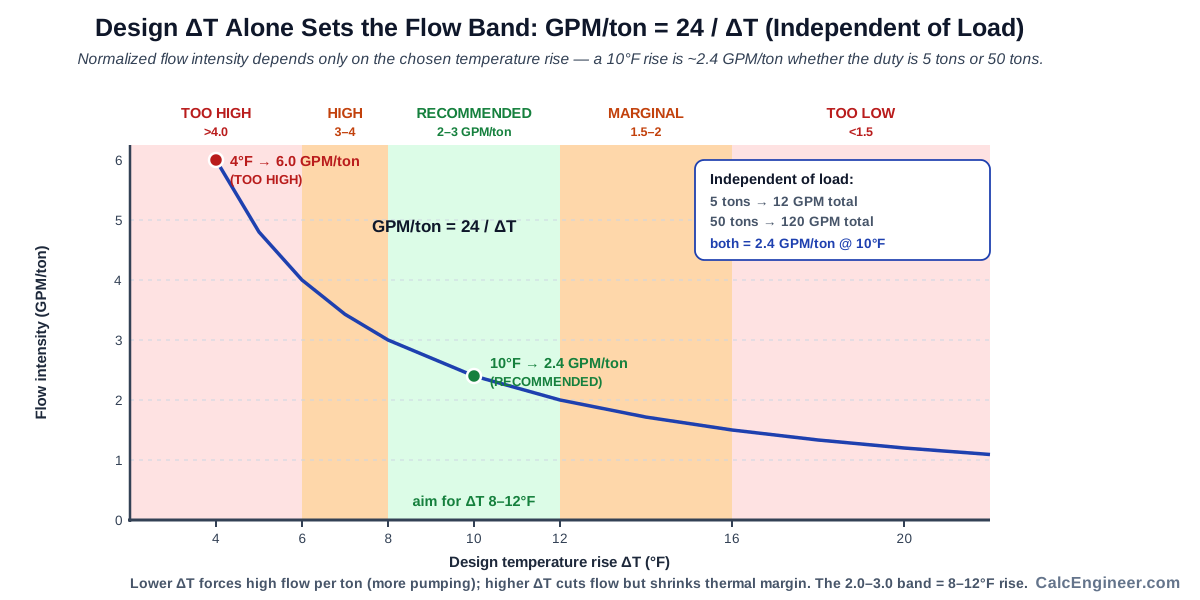
Normalized flow intensity depends primarily on the selected temperature rise, not the absolute cooling load. A 10°F temperature rise always produces approximately 2.4 GPM/ton regardless of whether the duty is 5 tons or 50 tons — because both the flow and the load scale together. This makes the normalized metric a useful tool for screening temperature-rise assumptions early in design.
A very low temperature rise (e.g. 4°F or 2°C) forces a very high flow rate per unit of cooling, pushing normalized intensity above the recommended band. A very high temperature rise reduces the required flow but can leave less thermal margin.
Because intensity is a pure function of ΔT, the recommended band maps directly onto a temperature-rise window. The RECOMMENDED verdict corresponds to a rise of 8.11 to 12.29°F, or 4.51 to 6.83°C. A design at a round 8°F falls just outside it and returns HIGH.
Engineering Applications
Liquid cooling flow rate calculations are used across HVAC and thermal engineering:
- Chilled water loop design — screening flow requirement and pump sizing basis
- Process cooling systems — verifying flow rate for heat exchanger thermal duty
- Data center liquid cooling — evaluating circulation rate for server rack heat removal
- HVAC coil sizing review — checking liquid-side flow against coil thermal capacity
- Thermal management planning — estimating required liquid flow for equipment cooling
- Pump selection screening — establishing the design flow basis before pump curve review
Practical Tips
Verify fluid properties for glycol systems. This calculator uses water-side factors. Glycol mixtures have lower specific heat and higher density than water, which changes the flow requirement. Apply correction factors before using this result for glycol loop design.
Use normalized intensity as a screening filter. Before moving to pump selection, check whether normalized flow is inside the recommended band. If it is far outside, the temperature rise or load basis should be reviewed before proceeding.
Trust the badge, not the rounded intensity. The band is decided on the metric intensity to full precision, while the GPM/ton figure is displayed to two decimals. A result printed as 3.00 GPM/ton can be 2.9962 internally, which is HIGH rather than RECOMMENDED. Where the displayed value lands on a round threshold, the status badge is the authoritative reading.
Don't confuse total flow with normalized flow. A very large system may have a high total GPM but still be inside the recommended band if the cooling duty is proportionally large. Always evaluate intensity relative to the load.
Important: Final liquid cooling system design should consider full hydraulic analysis, pressure drop across all circuit elements, pump curve verification, fluid properties, allowable temperature limits, and project-specific operating conditions.
Key Facts
- Liquid cooling flow rate depends on both cooling load and allowable liquid temperature rise.
- Lower temperature rise requires higher flow rate for the same cooling duty.
- Higher temperature rise reduces required flow but increases liquid-side temperature swing.
- This calculator uses one fixed flow-rate model based on water-side thermal properties.
- Both unit modes run the same metric decision model; the Imperial thresholds shown are converted equivalents, not independent round numbers.
- Normalized flow intensity is the main interpretation metric in the result system.
- A high flow result may indicate hydraulic conservatism or unnecessarily high pumping demand.
- A low flow result may indicate reduced thermal margin or an aggressive temperature-rise assumption.
- The recommended band in this calculator is 0.035 to 0.053 L/s·kW, which converts to 1.95 to 2.95 GPM/ton.
- The textbook Imperial constant 500 = 8.33 lb/gal × 60 min/h × 1 BTU/lb·°F; this calculator's composed conversion route gives an effective 500.63, so Imperial flow runs about 0.13% below the 500-rule figure.
- Flow intensity is displayed to two decimals, so a displayed value sitting exactly on a rounded threshold may fall on either side of the true cut. The status badge is authoritative.
Applications
- Chilled water circuit design
- Process cooling flow estimation
- Data center liquid cooling loop checks
- Heat exchanger liquid-side sizing review
- Pumping requirement screening
- Coil and thermal loop flow verification
- HVAC liquid-side design checks
- Glycol or water loop design review
- Equipment cooling flow estimation
- Thermal management system planning
Example Calculation
Example Calculation
Imperial Example
Given:
- Cooling Load = 10 tons (120,000 BTU/h)
- Temperature Rise = 10°F
Step 1 — Convert to metric:
coolingLoad_kW = 120,000 × 0.000293071 = 35.17 kW
temperatureRise_C = 10 × 0.55556 = 5.556°C
Step 2 — Calculate flow rate:
flowRateLS = 35.17 / (4.186 × 5.556) = 35.17 / 23.26 = 1.5122 L/s
flowRateGPM = 1.5122 × 15.8503 = 23.97 GPM
The 500-rule shortcut would give 24.0 GPM. The calculator prints 23.97 GPM because it converts through the metric route.
Step 3 — Normalize:
coolingLoadTons = 35.17 / 3.51685 = 10.0 tons
flowIntensityImperial = 23.97 / 10.0 = 2.40 GPM/ton
Interpretation:
2.40 GPM/ton is inside the 1.95 to 2.95 GPM/ton recommended range
Status = RECOMMENDED
Result: Liquid Cooling Flow Rate = 23.97 GPM | Cooling Load = 10.0 tons | Flow Intensity = 2.40 GPM/ton | Status = RECOMMENDED
Metric Example
Given:
- Cooling Load = 52 kW
- Temperature Rise = 6°C
Step 1 — Calculate flow rate:
flowRateLS = 52 / (4.186 × 6) = 52 / 25.12 = 2.07 L/s
Step 2 — Normalize:
flowIntensityMetric = 2.07 / 52 = 0.0398 L/s·kW
Interpretation:
0.0398 L/s·kW is inside the 0.035 to 0.053 L/s·kW recommended range
Status = RECOMMENDED
Result: Liquid Cooling Flow Rate = 2.07 L/s | Cooling Load = 52.0 kW | Flow Intensity = 0.040 L/s·kW | Status = RECOMMENDED
High-Flow Example (TOO HIGH)
Given:
- Cooling Load = 8 tons (96,000 BTU/h)
- Temperature Rise = 4°F
Step 1 — Convert to metric:
coolingLoad_kW = 96,000 × 0.000293071 = 28.13 kW
temperatureRise_C = 4 × 0.55556 = 2.222°C
Step 2 — Calculate flow rate:
flowRateLS = 28.13 / (4.186 × 2.222) = 3.0245 L/s
flowRateGPM = 3.0245 × 15.8503 = 47.94 GPM
flowIntensityImperial = 47.94 / 8.0 = 5.99 GPM/ton
The (24 × tons) / ΔT shortcut would give 48.0 GPM and 6.0 GPM/ton. The calculator prints 47.94 and 5.99.
Interpretation:
5.99 GPM/ton is above the 3.90 GPM/ton TOO HIGH cut
Status = TOO HIGH
Result: Liquid Cooling Flow Rate = 47.94 GPM | Cooling Load = 8.0 tons | Flow Intensity = 5.99 GPM/ton | Status = TOO HIGH
Standards & References
- ASHRAE Handbook — HVAC Systems and Equipment — chilled-water system design practice
- ASHRAE Applications Handbook — liquid-side loop design and flow guidance
- ACCA Manual N — commercial HVAC load calculations
- ASHRAE 90.1 — energy standard for chilled-water system design
- ASHRAE Fundamentals Chapter on Fluid Flow — hydraulic design basis
- Heat exchanger and coil flow calculations — manufacturer design guides
- Pump and pressure-drop review — project-specific hydraulic design basis
Limitations
- This calculator uses a fixed water-side relationship and does not replace full hydraulic design.
- It assumes water-based properties in the core formula.
- Glycol mixtures require correction factors for density and specific heat not included here.
- It does not automatically account for non-water fluids unless corrected fluid-property logic is applied.
- It does not calculate pressure drop or pump power by itself.
- It does not verify equipment pressure limits or pump curve compatibility.
- It assumes the cooling load and temperature rise are correct and non-zero.
- It is best used for screening flow requirement and normalized flow intensity.
- A recommended flow intensity does not guarantee optimal hydraulic design if pressure drop, velocity, or fluid properties are unfavorable.
Common Mistakes to Avoid
- Forgetting to convert BTU/h to tons before normalizing GPM/ton manually.
- Using a temperature rise of zero or near zero, which makes flow rate calculation invalid.
- Mixing Imperial and Metric units in the same calculation.
- Assuming higher flow is always better — it increases pumping demand and hydraulic resistance.
- Ignoring pump power and pressure-drop impact when selecting a low temperature rise.
- Using water-based factors for non-water fluids without applying glycol correction factors.
- Treating normalized flow intensity alone as proof of correct design.
- Forgetting that the selected temperature rise strongly drives the normalized flow result.
Frequently Asked Questions
What does the Liquid Cooling Flow Rate Calculator calculate?
What formula does this calculator use?
What is the recommended normalized flow range in this calculator?
Why does lower temperature rise increase required flow?
What does a high normalized flow result mean?
What does a low normalized flow result mean?
Can I use this calculator with both Imperial and Metric units?
Does this calculator include pressure drop or pump power?
Frequently Used Together
Engineers often use these calculators in combination for complete project workflows:
Related Calculators
Explore similar calculators that might be useful for your project:
Free HVAC Quick Reference. Formulas & Checks.
Airflow, loads, refrigerant & duct checks — one printable page for the job site.
- Key formulas for airflow, load, refrigerant charge & duct sizing
- Quick sanity checks for the most common HVAC design errors
- Printable one-pager for field use and design review
No spam. Unsubscribe any time.
Calculate
Enter the cooling load in BTU/h (e.g. 120,000 BTU/h = 10 tons)
Enter the liquid temperature rise across the circuit in °F